


Citizen: Protect The World
4.531.57K Reviews
App Specs
- Version
- 0.1300.0
- Updated On
- License
- Free
- Downloads
- 5,000,000+
- Developer
- Sp0n Inc.
- Categories
- News & Magazines
- Platform
- Android, iOS
Screenshots
 Analysis by AppCompare
I would treat Citizen as a neighborhood-awareness tool, not as a personal security service or a substitute for emergency help. Its appeal is the chance to notice local incidents while they are unfolding and decide whether they matter to your plans. That can be useful when you are heading out, checking on an area you know, or trying to understand why a familiar route feels unusually busy. It can also make a steady stream of unsettling updates harder to ignore, so the best experience depends on using it with a clear purpose.
The app sits in the news and magazines category, but it feels different from a conventional headline reader: its focus is nearby events and community reports rather than a broad selection of national or international stories. I see that local emphasis as its strongest reason to install it. It is developed by Sp0n Inc., is free to download, and has a 4.5 average from around 102,000 ratings, with more than 5 million installs. Those figures suggest a sizeable audience, but they do not tell you whether the alert mix will suit your neighborhood; that depends heavily on where you use it and what you want to follow.
What the current version is meant to do
The current version is 0.1278.1, and the app’s basic proposition remains straightforward: keep users informed about emergency activity and local community updates. The version number tells me which build is current, but it does not, by itself, show what changed between releases. I would avoid treating it as proof of a particular new feature or a promise that the app has become more accurate. For a potential user, the practical question is whether the latest version runs on their device and whether local information is useful enough to justify notifications.
Citizen is free, though it includes in-app purchases priced from $4.99 to $399.99 per item. That range is worth noticing before you explore optional paid features, especially if you prefer apps with no purchase prompts. I would start by using the free experience and deciding whether the alerts and local coverage are valuable in your routine before considering any spending. The app is rated for Teen audiences, and its subject matter can involve reports of serious incidents, so it may not be comfortable for every younger user or household.
How the experience affects everyday users
If you already follow local news, Citizen can add a faster, more place-focused layer rather than replace the sources you trust. A local news site or broadcast is usually better for context, confirmed reporting, and a fuller explanation of what happened. Citizen’s advantage is immediacy and proximity: an alert may give you an early reason to avoid an area, while a traditional news report can help you understand the event later. I would use the two for different jobs rather than expect either one to do everything.
There is also a trade-off in how community updates feel. Reports from users can make a feed more responsive to what people nearby notice, but a report is not automatically the same as a verified account. I would read an alert as a prompt to pay attention, not as a complete explanation of an incident. If a detail could affect an important decision, check a reliable official or local news source before acting on it. That cautious habit makes the app more useful without asking it to carry more certainty than a community-focused feed can provide.
What to keep in mind before relying on alerts
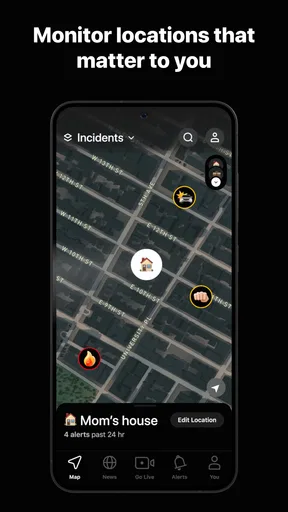
Notifications are helpful only when they remain relevant. If you follow several places, updates from one area can compete with information about another, so it is worth being deliberate about which locations deserve your attention. I would begin with the places that genuinely affect daily decisions, such as home or work, and add other areas only when I have a reason to monitor them. This keeps the feed from turning into a general stream of incidents that is easy to tune out.
Worth Reading Before You Choose

EA SPORTS FC Mobile 26 Is a Bigger Football Game, but It Takes Time

Flipboard Shows What News Apps Must Do Beyond the Feed

Switching to Android Auto Means Rethinking Your Driving Routine

Google Calendar Makes a Crowded Week Easier to Manage

Ludo King Makes the Most of the Minutes Between Plans

Baby Panda World Brings Quick Play to Modern Phones, but Its Game Library Feels Busy
Location access is another personal decision. The original experience describes it as part of setup, but anyone uncomfortable with sharing location should pause and review the permissions and privacy choices shown on their own device before continuing. I would not rely on broad assurances in an app description as a substitute for reading the current in-app explanation. If you would rather not grant location access, a standard news app or a local authority’s public information channels may be a better fit, even if they are less tailored to nearby activity.
Who is likely to get the most from it
I can see Citizen working best for people who travel around a familiar area, live in a place where local incidents affect their routes, or want a quick sense of what is happening near more than one location. It may also interest someone who likes contributing observations to a neighborhood feed, provided they are careful to report only what they know and avoid turning uncertain impressions into claims. It is less suited to anyone who wants a calm, curated news digest, dislikes location-based services, or finds repeated reports of emergencies stressful. In those cases, a conventional news source with chosen topics and scheduled reading may be a more comfortable option.
A useful everyday approach is to check the app before leaving rather than react automatically to every notification. If an alert appears near a planned destination, I would look at the location and available context, then decide whether to take another route or confirm the situation elsewhere. That turns the app into a small planning aid instead of a source of constant alarm. It is also sensible to keep ordinary safety habits in place: an app can inform a decision, but it cannot assess every condition around you or guarantee that a route is safe.
Where I land on Citizen
Citizen’s value depends on a simple distinction: it can help you notice local activity, but it should not be treated as an authoritative emergency channel. I like the idea of having a place-based feed available when I want to check an area, and I would recommend trying it to people who actively use that kind of information. I would be more cautious about recommending it to someone who expects every report to be confirmed, wants detailed journalism, or does not want location-related choices in a safety app.
For Android users, the stated minimum operating system is version 9; iPhone users should check the compatibility information shown for their device before installing. The app is free to start, with optional purchases, and its Teen age rating is another practical consideration for families. If you try it, begin with a small number of relevant locations, review notification and privacy choices, and give yourself permission to mute or remove it if the feed adds more worry than useful awareness. Used selectively, Citizen can be a helpful companion to local news and common sense, rather than a replacement for either.
Getting Started with Citizen
First things first, downloading the Citizen: Protect The World app is a breeze. Available on both Android and iOS, it’s just a quick search away in your respective app store. Once installed, you’re greeted with a clean and intuitive interface that’s pretty straightforward, even for the tech-averse among us.
Setting up is quick; the app asks for location access, which is crucial for its functionality. You can choose to follow specific areas, making it perfect for those who travel frequently or just want to keep tabs on multiple locations. I've got my home and work locations set up, and it's fascinating how much happens in these areas that I wasn't aware of.
Real-Time Alerts: Your Personal Safety Net
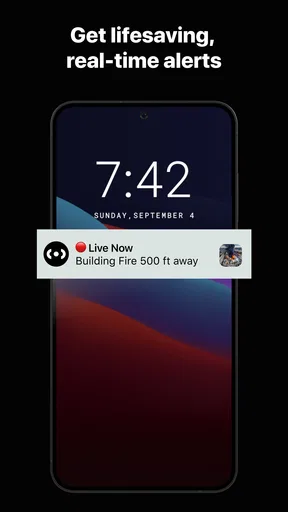
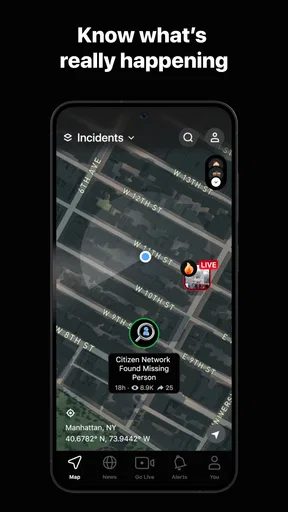
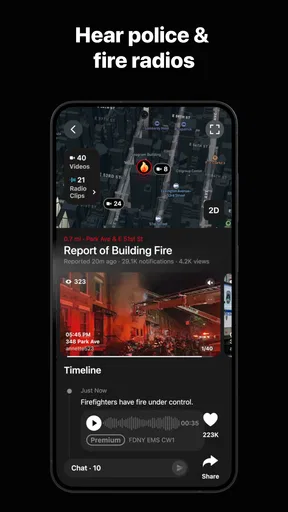
One of the standout features of Citizen is its real-time alert system. The app notifies you about incidents like police activity, fires, or even missing pets. These alerts are generated from various sources, including police scanners and user reports. The speed and accuracy of these alerts are impressive. It’s like having an ear to the ground at all times.
There was one instance where I received a notification about a roadblock due to an accident on my usual route home. I was able to avoid a traffic nightmare, all thanks to Citizen. It’s these little things that make me appreciate the app.
Community Engagement: Safety in Numbers
Another feature I find intriguing is the community aspect. Users can report incidents and provide updates, which fosters a sense of community vigilance. Whether it’s a suspicious activity or a lost pet, the app allows you to contribute to the safety of your neighborhood. It’s like having a digital neighborhood watch.
The app also includes a feature called "SafeWalk," where friends or family can virtually accompany you on your journey. If you’re someone who often finds themselves walking alone at night, this feature is a game-changer.
Privacy Concerns: A Balancing Act
Now, with all this information sharing, you might wonder about privacy. The app does require access to your location, which might be a dealbreaker for some. However, the developers assure that they take privacy seriously, and location data is not stored without consent.
It’s a delicate balance between safety and privacy, and while I feel comfortable with the permissions, it’s something to consider if you’re wary about sharing your location data.
Usability and Design: Simple Yet Effective
The design of Citizen is minimalistic, which I appreciate. There are no unnecessary bells and whistles to distract you from its primary purpose: safety. The app is easy to navigate, and the alerts are prominently displayed without being intrusive.
Even if you’re not tech-savvy, you’ll find the app’s functionality quite accessible. The developers have done a commendable job making sure everything is just a tap away.
Conclusion: A Must-Have for the Safety-Conscious
In a world where safety is paramount, having an app like Citizen: Protect The World feels like a necessity rather than a luxury. It provides peace of mind, knowing that you’re always in the loop about what’s happening around you. While the privacy concerns are valid, the benefits of being informed and prepared outweigh the cons for me.
If you’re someone who values staying informed and contributing to community safety, Citizen might just become your favorite app. Give it a try, and you might find yourself wondering how you ever lived without it.
Pros
- Real-time alerts on local incidents.
- Community-sourced safety updates.
- User-friendly interface design.
- Live video streaming feature.
- Customizable alert settings.
Cons
- Limited global coverage areas.
- Battery consumption is significant.
- Notifications can be overwhelming.
- Privacy concerns with location data.
- No offline mode available.
FAQs for Citizen: Protect The World
What is Citizen: Protect The World?
Citizen: Protect The World is a community-focused safety app designed to keep users informed about incidents and emergencies in their area. By providing real-time alerts and updates, it empowers individuals to make informed decisions about their safety and the safety of those around them. It's available for both Android and iOS.
How does Citizen: Protect The World work?
The app uses GPS to deliver real-time notifications about emergencies, crimes, and other significant incidents near your location. Users can also report incidents they witness, contributing to a community-driven safety network. This collaborative approach ensures that information is both timely and relevant, helping to enhance community safety.
Is Citizen: Protect The World free to use?
Yes, Citizen: Protect The World is free to download and use. However, it may offer in-app purchases or premium features that provide additional benefits, such as access to more detailed reports or enhanced notification settings. Users can choose to use the free version or explore premium options depending on their needs.
What are the privacy concerns with using Citizen: Protect The World?
Citizen: Protect The World requires location access to provide accurate alerts. While this raises privacy concerns, the app is committed to safeguarding user data and uses encryption to protect personal information. Users should review the app’s privacy policy to understand how their data is managed and what measures are in place to ensure security.
Can I interact with other users on Citizen: Protect The World?
Yes, the app allows for community interaction, enabling users to share information and updates about incidents. This feature fosters a sense of community and collaboration. However, interactions should remain respectful and adhere to the app's guidelines to maintain a helpful and secure environment for all users.


